Motorola DTR Series Handheld Radios: Frequency Hopping Spread Spectrum for the Rest of Us

The Motorola DTR650 radio.

TL;DR: Motorola DTR 900Mhz FHSS radios perform at least as well as other popular radios operating on FRS, GMRS, or MURS. Additionally, they add a level of privacy that can’t be matched by any other license free service and, by some measures, offer security better than encrypted radios operating on a single frequency.

INTRODUCTION

Frequency Hopping Spread Spectrum (FHSS) is a technique used in radio communications. In an FHSS system, a transmitter changes frequency on some schedule (usually many times per second). Contrast this with single-channel radios which may be able to change frequencies but can only transmit or receive on one frequency at a time. For an FHSS system to work, the receiver must be synchronized with the transmitter in some way and both the transmitter and receiver must have prior knowledge of the frequency hopping sequence to use so they can remain synced.

Historically, FHSS has been complex and expensive to implement. Additionally, the FCC prohibits use of FHSS in the amateur radio service below the 70cm band. This has kept the use of FHSS by experimenters to a minimum, thus relegating it to government agencies. There is, therefore, a dearth of readily available equipment to put FHSS to practical use. That is a shame because FHSS offers a number of advantages that are worth listing here.

  1. FHSS systems are resistant to radio interference, multi-path attenuation, and jamming. Obviously this feature has military applications but with the proliferation of interference causing devices it is also a feature for the informed operator. It also means better performance at the edge of coverage or from mobile stations than single-channel radios.
  2. FHSS systems are more efficient users of radio spectrum. Single-channel radio services require strict frequency assignments and channel spacing to avoid interference. Users who are assigned a frequency occupy that spectrum whether they are transmitting or not. FHSS, like trunking LMR systems, allows more users to share the frequency spectrum. A great feature for crowded spectrum conditions.
  3. FHSS systems are harder to detect and direction find than single-channel radios. No consumer grade scanners are fast enough to detect and track FHSS signals. Similarly, you won’t hear them on a conventional receiver. The signals can be detected by a spectrum analyzer, SDR, or possibly a near-field receiver, but can’t be eavesdropped on with any of the above. This means FHSS offers significant privacy advantages even without encryption.

ENTER THE DTR650

I have been aware of Motorola’s DTR series radios for at least a decade as they are actually old technology now. Based on the iDen cell phones that were used by Nextel for their DirectTalk (that quirky walkie talkie style operation between cell phones you remember from the 90s) feature, the DTR series radios have been out since the early aughts. They were close to $400 per handset at time of their release and prices stayed high for a long time, keeping me out of the market. A couple of years ago, Motorola released their second generation DTR lineup so legacy users are now upgrading their fleets. Lots of DTRs are hitting the surplus market so now is a good time to look on eBay for a good deal. That is how I ended up getting a lot of five DTR650s for 60 bucks a pop, complete with batteries and chargers. As with everything on eBay, caveat emptor. Make sure all the parts are included for a working radio if decide to bid.

Although classed as business radios, the Motorola DTR series operate in the license free 900Mhz ISM band. As such, they are limited to one watt of output power (not a major limitation for simplex use).

The DTR650 is the top of line radio in what I would call the “GEN 1” DTR line-up. The other radios in this generation are the DTR410 and DTR550. They look like late 90s era cell phones and share some accessories with the iDen phone lineup. I can confirm, for instance, that the iDen car charger works with the DTR650s.

With a little TLC, my small fleet of DTR650s cleaned up nicely. The screens are bit scratched but it doesn’t affect function so I’m not going to worry about it. It seems spare parts are still available from various Motorola dealers and on eBay if you need something.

Unlike most Motorola products, the Customer Programming Software (CPS) for these is a free download. Just do a search for Motorola Business Radio CPS. You don’t the CPS to program most functions as an exotic series of key presses will put the radio into programming mode. That said, I highly recommend getting a programming cable and using the CPS if you are going to work on more than a couple of these radios. If you have programmed other business band radios before, like DMR or P25 type radios, then you’ll pick up how to program the DTRs in a just a few minutes. If you’ve never programmed a part 90 radio before then the next section should help clarify how these work.

PROGRAMMING THE DTR650

Each DTR handset has a unique serial number assigned to it. The CPS can read this number back automatically to save you some time. The programming file you will create for these radios, called a codeplug, needs to include the serial numbers of all the other radios in your network if you want the private talkgroup or private one-to-one features to work. So the first step is to read back all your serial numbers into the CPS. I then copied these to a spreadsheet for future reference.

In the CPS, you’ll enter your serial numbers as “Privates” in the appropriate field. You can also give your radios a unique human readable name.

There are ten available “Channels” but these aren’t channelized frequencies in the traditional sense. Instead, each DTR channel is a set of 50 frequencies between 902 and 928 Mhz called a hopset. The DTR family of radios hops frequencies at a rate of 11 times per second for a dwell time on any particular frequency of about 90ms (yep, that’s milliseconds). You can segregate traffic on your network by using the ten channels but you can also setup multiple talkgroups to use the same channel because the radios will only respond to other radios using the same talkgroup. In fact, the radios come configured from the factory with five talkgroups pre-loaded and all of these use channel 1.

When you setup your Privates in the CPS, you have to assign a channel to the radio. I’m not sure why they forced this on the user, because the radios can operate between channels using public talkgroups. To use the private talkgroup feature, however, you can only use the channel assigned to the radio. With the DTR650s this means you can only effectively have one private talkgroup. This is true because even though the radio allows you to create multiple private talkgroups, the DTR650 (and presumably others in the series) always scans all the private talkgroups and responds to any that are transmitting. So there really isn’t a way to segregate traffic on your radios using multiple private talkgroups. I find this to be an odd limitation but I’ll admit you can configure public talkgroups to have substantial privacy by changing the defaults so this probably isn’t a practical limitation for most networks.

PRIVACY & SECURITY

Public talkgroups will allow any handset using the same channel and talkgroup name to communicate with the network. The DTR650s come preprogrammed with five public talkgroups already setup. A number of DTR users have noted that business users of these radios often use the default public talkgroups so are easy to eavesdrop on.

Private talkgroups increase the level of security by restricting the talkgroup to handsets that know the private ID of the talkgroup. The CPS asks you to choose one of the serial numbers in the talkgroup to be the private ID. This is a potential security risk because the handsets broadcast their ID on the public talkgroups which could allow someone to collect the private ID of your private talkgroup. Not a problem though, because you can create a Private with a bogus serial number you make up and add it to your codeplug. That bogus ID won’t ever transmit on a public talkgroup so you can use it as the private ID of your private talkgroup without concern that another user might exploit it.

Initially, I assumed that this private talkgroup feature was like a selective digital squelch that would open only for those radios listed as belonging to the private talkgroup. That isn’t the case though. Any handset that has the correct private ID can communicate with the private talkgroup whether a particular handset lists the transmitter as a member of the talkgroup or not.

There was some speculation some time ago that the private ID of the private talkgroup was a seed used to randomize the hopset. If true this would offer substantial additional security. Sadly, I don’t have the equipment or expertise to validate this. That said, I have my doubts that these radios are that sophisticated. More likely, each hopset has a set pattern that is always used with metadata such as the handset ID, talkgroup ID, or private ID being used to segregate traffic. Even if Motorola’s algorithm had a mechanism for randomizing the hopset, they must be using a synchronization frame at the beginning of each transmission because the alternative would be having very accurate Time of Day (TOD) clocks on each handset. This would drive up both price and user frustration as even small differences in clock synchronization would cause missed transmissions. In any event, the synchronization frame by definition must contain enough data for the other handsets in the network to receive the transmission. This being the case, hopset randomization would only increase security in the event that an eavesdropper couldn’t receive or decode the synchronization signal.

While you might rightly conclude that the Motorola’s FHSS implementation is fairly simple it would be wrong to conclude that it offers no security. As I write this, there is no off the shelf solution to listen in to these radios. No consumer level scanner or communications receiver will do so. These are even safe from currently available SDR dongles and decoder software. My SDR with the widest receive bandwidth is the HackRF One which is capable of staring at 20Mhz of spectrum at once. This still isn’t sufficient to capture the full 26Mhz frequency hopping range of the DTRs. It might be possible to use several cheap RTLSDRs in parallel if you knew the hopping pattern and could tune the dongles fast enough to follow the hop rate. There are libraries available to decode the VSELP vocoder used by these radios to digitize voices, assuming Motorola is using a standard VSELP implementation. Since its Motorola we’re talking about here, of course it’s proprietary! So there would almost certainly be some additional reverse engineering and software writing required to build a solution for monitoring these. If I had to guess, a college student could probably get a working prototype underway with 3-6 months of development using COTS hardware and a combination of open source and custom code. Being a niche product, nobody to date has put in the work on this.

So you can’t eavesdrop on these radios but can they be detected? Yes, they can. A spectrum analyzer or SDR dongle will at least do that. My TinySA Ultra doesn’t refresh fast enough to fully track the hop pattern but easily detects enough signals in the 900Mhz ISM band to make it obvious to a trained user that FHSS is being used. In crowded urban conditions, however, the DTR traffic might blend in with other 900Mhz traffic from consumer devices, hospitals, and SCADA systems, especially since these are limited to 1 watt of output power. I also tested the Close Call feature on an SDS100 scanner. The SDS100 will show you there is activity in the UHF band but doesn’t give a close call hit. Some folks have said a near field receiver like the Optoelectronics Xplorer will detect and follow the hopping pattern on DTRs but I wasn’t able to replicate that result myself.
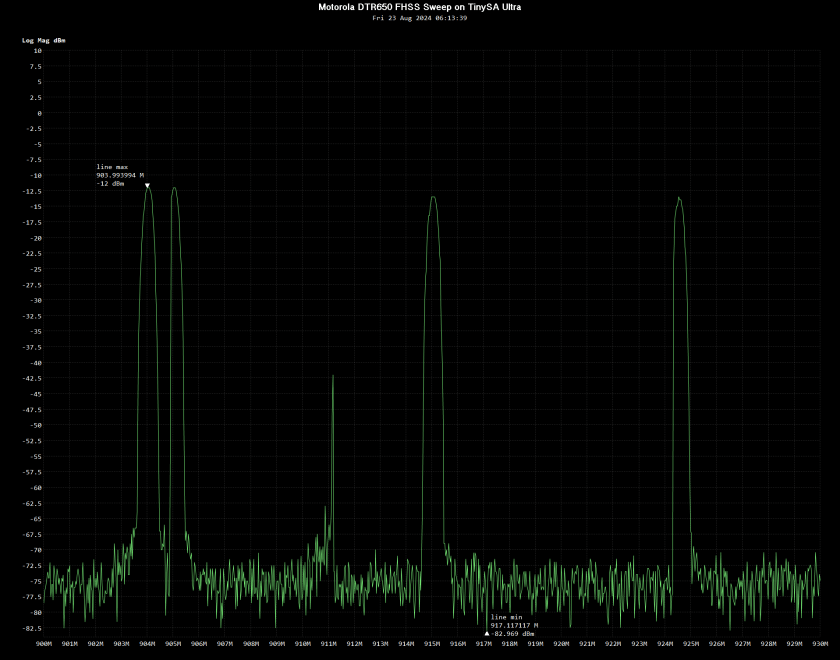
A spectrum sweep of the DTR650 taken from 900-930Mhz with a TinySA Ultra.

In sum, these DTRs offer significantly more security that any other consumer level radio. Encrypted radios might offer more privacy but the only commercially available encrypted radios are single-channel solutions like P25 or DMR. Off the shelf scanners will detect P25, DMR, NXDN as well as analog using basic frequency searches as well as by using features like Uniden’s Close Call. Even if I can’t listen in on encrypted P25 traffic, for instance, I can certainly know that it is there and knowing someone is there is useful all by itself. I can also use off the shelf tools to do traffic analysis on P25 or DMR networks even if they are encrypted because the metadata is not. There is no comparable way to exploit DTRs using off the shelf tools, either to monitor the transmissions or the metadata.

Put another way, we can distinguish between Communications Security (COMSEC) and Transmission Security (TRANSEC). Encrypted P25 radios, for instance, offer COMSEC because they protect the contents of each transmission from anyone who doesn’t have the appropriate key. The Motorola DTRs, on the other hand, offer TRANSEC because they obscure the fact a transmission is being made at all and make it extremely difficult to monitor even if the signal is detected. It may be a form of security by obscurity but if you know that and it fits your use case then you may get a lot of value from the DTRs.

PRACTICAL USE IN THE FIELD

The first thing everyone asks about two way radios is, “How far can I talk with these things?” Range in my mixed rural/residential neighborhood was about a mile. Comparable to other other simplex services like MURS or GMRS. Frankly, I was impressed because the summer foliage in my AO is almost jungle thick and I expected significant performance issues on 900Mhz in this environment. Others have posted ranges of 10-20 miles in open terrain such as along coastlines or in the desert. Like other VHF/UHF radios, these are terrain limited and not propagation limited. Motorola advertised these as ideal for urban use in office buildings and warehouses. In those environments, you can probably expect outstanding performance as 900Mhz penetrates urban construction well. Several online users have noted these radios as working especially well on cruise ships with better deck penetration than GMRS.

There is a slight learning curve to using the DTRs as they are fully digital radios. Users used to analog radios will be a bit annoyed at first because there is a slight delay between pressing the PTT and being able to talk. To start a conversation, push the PTT and wait for the talk-permit tone, then start speaking. If you don’t wait for the talk-permit tone, the start of your conversation will get cutoff. This is consistent with other digital radios, even professional P25 and DMR radios, especially if they are on trunking systems. Users accustomed to digital shouldn’t have a problem. I was able to teach both my wife and my elementary aged kids how to use these radios with just a few minutes of instruction.
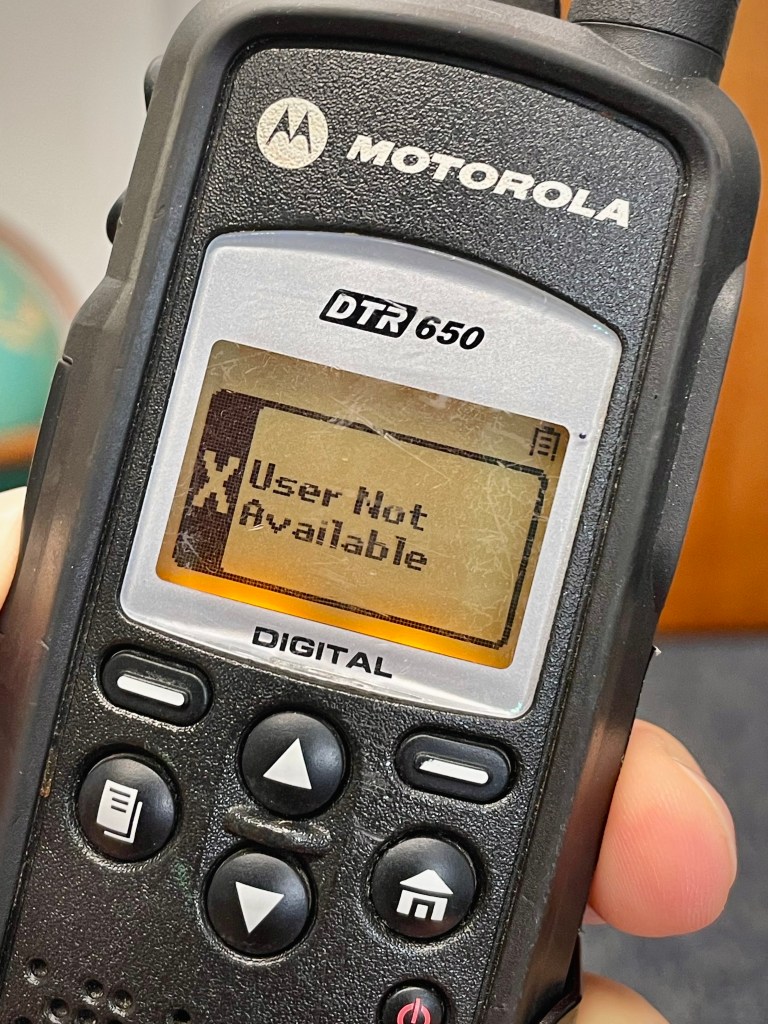
A unique feature of the Motorola DTR series is they let you know if you are out of range of others users in your talkgroup.

An interesting feature of the DTRs is that they will let you know if there are no users within range on your talkgroup. This makes range testing easy as you won’t need a partner to help you. It also keeps you informed if your group gets too spread out of if intervening terrain or structures are blocking your signal.

Given their cell phone lineage, the handsets are rather lightweight. Battery life is excellent and should last at least one normal work shift, possibly two, before needing to be recharged. My batteries are all at least a few years old and still giving decent service.

The DTR650s use rubber overmolded plastic construction and sport a MIL-STD 810 compliance rating. They are substantially more rugged than a Baofeng but not up to the standard of submersible radios like the Yaesu VX-6R or professional public service radios like Motorola’s XTS or APX series. Overall I like the construction of the DTR650s, they have character and are a nostalgic reminder of the 90s.

Sadly, the rubber overmolding on a lot of these is showing its age and is getting brittle. Heavily used Gen 1 DTRs often show signs of the rubber disintegrating. Port covers built into the overmolding frequently break off their hinges. For casual use it shouldn’t be a problem but demanding users will want to consider getting the current generation DTR600 or DTR700 radios.

The antennas on these are removable and Motorola offered at least two antenna variants, a quarter-wave stubby and a longer half-wavelength model. Spare antennas are getting harder to find so I haven’t yet acquired a pair of the longer antennas to do comparison testing. The stubby antennas seemed to have been the most popular judging from the used radios available on eBay. Larger external antennas, including homebrew, should be possible. Other folks who have published their results said they didn’t work but I expect that is because Motorola uses a semi-proprietary SMA connector on their handhelds. It is called an SF SMA and RF Parts has SF SMA to BNC adapters available. I acquired a couple of these adapters and early testing looks promising. Of course, the attenuation over coax of any 900Mhz signal is going to be high so long cable runs will quickly negate any gain advantages of a larger external antenna. Keep the cable runs short!
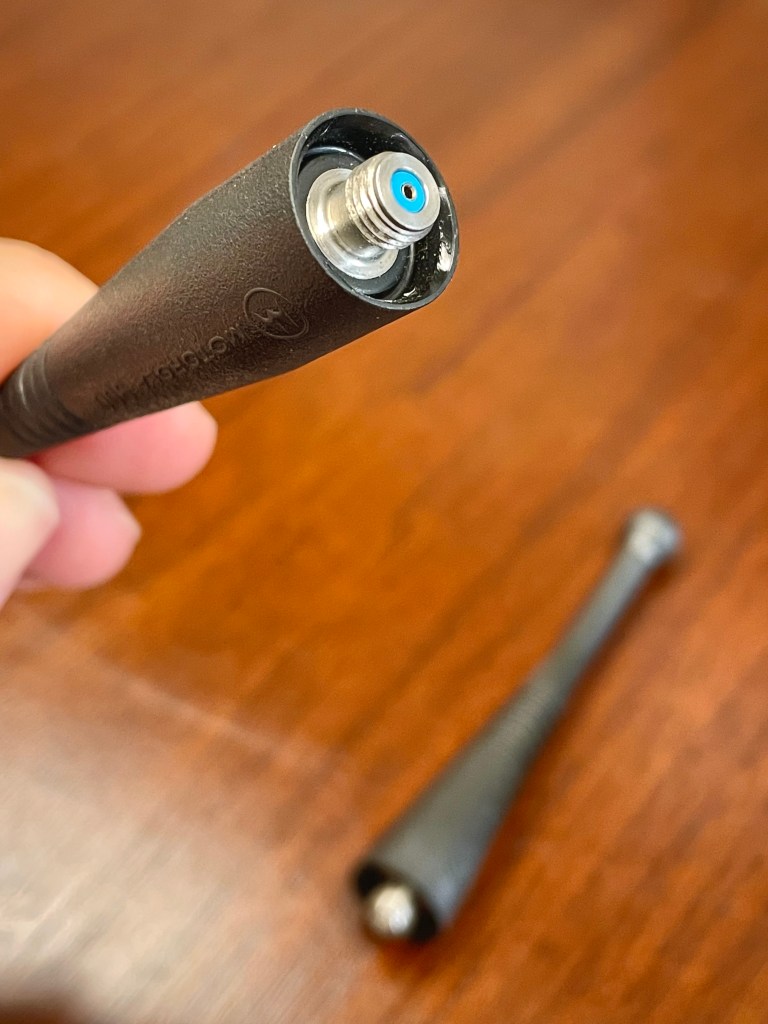
Here is the SF SMA connector used by Motorola handheld radios. Take a close look at a standard SMA female and see if you can tell the difference.

A feature noticeably missing from these radios is a feature to lock the keypad. On part 90 programmable radios I enable the keypad lock by default so inadvertent button presses don’t cause issues. Lacking this feature, the DTRs are definitely susceptible to ending up on the wrong talkgroup if the user accidently presses the wrong button. There is a partial mitigation for this. In the CPS, under Privates, set the handset Homegroup to the talkgroup you want to use. With this setting in place, the user can change the talkgroup only temporarily. After 30 seconds of inactivity the handset will revert to the Homegroup. Handy to keep everyone on the same talkgroup but a pain if you have a large fleet of radios and need to make decisions on how to segregate traffic in the field.

There is one firm offering a repeater compatible with the Motorola DTRs. It is expensive at around $1,500 per device and each repeater system requires two of these devices. These repeaters are also limited to the 1 watt maximum power allowed by the FCC for FHSS devices on the 900Mhz ISM band so don’t expect miracles.

A BRIEF NOTE ON THE FUTURE

At the time of this writing, there is a proposal from a business entity before the FCC to commercialize the 900Mhz ISM band used by the DTRs, as well as cordless phones, baby monitors, Meshtastic nodes, and innumerable other devices that rely on low power, license free spectrum. It is unclear if these millions of legacy devices will be grandfathered in if the FCC approves this request or if the devices will even be useable if they are. The company forwarding this proposal wants to operate 2kw transmitters on a portion of this band. I can’t imagine many devices handling that level of interference gracefully. Keep an eye on this proposal and reach out to the FCC with your comments if this sounds troubling to you.

CONCLUSION

The Motorola DTRs have a number of significant advantages and few faults. I suspect most users of GMRS or MURS would be better off with something like these unless they truly need the coverage offered by a GMRS repeater. The only real disadvantage to these I can think of is a lack of interoperability with other radio services. These aren’t general purpose, one-size fits all radios. Rather, if you want simple, high privacy, and high reliability communications for on-site applications then consider trying these, especially if you might be operating where GMRS or MURS congestion is high. Properly programmed, you’ll never hear another soul on these you don’t want to hear and they won’t hear you either.
Lab599 TX-500 SSB Audio Settings

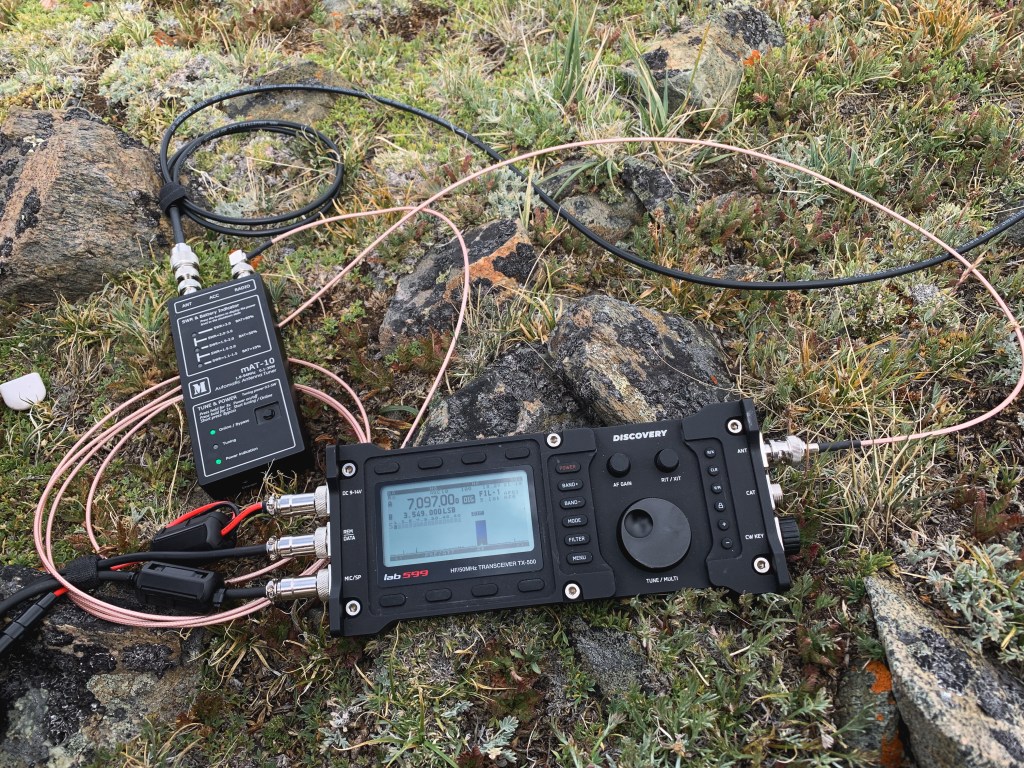
Lab599 TX-500 at about 10,000ft ASL on Montana’s Hellroaring Plateau back in 2021.

The Lab599 TX-500 is a fascinating radio and a great first entry from the Russian startup company. Hopefully they will be able to continue development of future products and further refine the design. I was an early adopter and have travelled a lot of miles with the TX-500.

On the TX-500 groups.io reflector, the question frequently comes up of what audio settings to use with the rig. As a fully SDR rig, it has a fairly extensive set of options to get the most from your SSB audio. When properly set, performance is excellent and I’ve never failed to make contacts with this rig if using an efficient antenna, even limited to 10 watts.

The first step is to set the MIC gain according to the procedure in the manual. This radio is different from every other ham rig out there in that it has separate indicators for MIC gain and ALC. ALC only engages on the the TX-500 if there is an SWR foldback issue so ignore the ALC meter and use the MIC meter for input level adjustments.

Once the MIC level is properly set, I adjust my filter width, compression, and EQ settings as follows.

EQ RX, LF: 45, MF: 70, HF: 85
EQ TX, LF: 45, MF: 70, HF: 85
TX FIL 1, LF: 350, HF: 2700 (2.35k), CMR: 4
TX FIL 2, LF: 500, HF: 2600 (2.1k), CMR: 3

I generally run the RX filter to match TX FIL 1 above.

I’ve noticed that the TX-500 allows you to set values that are well above the level required to cause clipping or distortion in the DSP signal chain. The best practice with this rig is to never max out any of the settings.

My voice is fairly low pitched and ruddy sounding and the above settings give me good bright punchy audio. My advice is to start use these settings as a starting point with your own voice and make recordings of your transmitted audio using another rig or a Web SDR. Make small adjustments until you are pleased.

The narrow TX filter combined with compression really helps concentrate your talk power to get the most from your 10 watts. As you narrow the filters, however, I’ve found I need to back off the compression to compensate.

Hope that helps!

73,

Padre

Elecraft KX2: First Impressions


My preferred mode of operation is portable HF radio and, like many operators, I like trying new rigs. The radio intelligentsia often speak highly of the Elecraft KX2 but up until now I haven’t been able to bring myself to buy one on account of cost and perceived lack of ruggedness. A couple of things have caused me to change my mind and give the KX2 a second look.

My main reason for giving the KX2 a try is I’ve been working on building a lightweight HF radio kit and the KX2 is exceptionally lightweight. Besides being inherently lightweight with its stamped sheet metal exoskeleton, the KX2 is capable of accepting a 2.5 AH internal lithium ion battery and an internal tuner. This saves the extra weight and bulk of carrying these items separately. Earlier this year, Elecraft released an add on board that allows for internal charging so it is even more convenient. It sips power so the internal battery is reasonably useful. I haven’t weighed this rig yet but it is remarkably light and compact.

At this point it is worth pointing out the importance of a tuner. No portable military HF radio made in the last 60 years lacks a built in tuner. Even with a resonant antenna, the portable HF operator can’t always prevent ground conditions or some other confounder from making your antenna less resonant than it should be. A built in tuner is simply common sense and good insurance and the amateur radio manufacturers are remiss in not providing this feature on their radios.

Moving on, I do have a Lab599 TX-500 also and have been exploring a lightweight kit with that rig as well. The TX-500 is such an interesting rig but it its not flawless. That takes me to my secondary reason for wanting a KX2. Namely, my TX-500 been sent into service twice for repairs and I question its long term reliability. The TX-500 deserves its own review so I’ll save further elaboration for another time.

I’ve had the KX2 now for about two weeks. Initially, I had some frustration with making sense of the controls but the manual is quite well written and easy to follow. For instance, the first time I used it on SSB I found a strangely distorted sound played back from the speaker. I thought this was RFI and was immediately concerned my used rig had a problem but I realized that there might be a monitor function left on by the prior owner. Sure enough, I quickly found the setting to check and was able to fix it with just a few minutes skimming the manual.

The Digirig I purchased for the KX2 also had issues. Since it was a new rig, I wasn’t sure if I had a settings issue on the KX2 or a bad cable. It turns out the Digirig itself had its jumper settings misconfigured. A few minutes with a soldering iron had serial rig control working just as it does with any of my other radios. After a couple of days of troubleshooting software and rig settings I’m glad it was a simple fix.

It is said the KX2 has digital modes as an afterthought. While true for a couple of reasons, I have found it usable so far and not too much of a hinderance. One thing I realized early on is this rig doesn’t have a full set of memory settings for data mode operation. For instance, the mic gain setting is shared by the hand mic and your data mode interface. This could be a serious problem but, in practice, I was able to set the computer audio out settings such that the mic gain can stay where it is with both voice and data modes. No issues there.

There is one other odd consequence to the way the KX2 handles data. Namely, the lack of receive audio monitoring when a data mode interface is connected. Since the Digirig connects through the headphone jack, plugging it in interrupts the speaker output. I’m accustomed to listening to ensure the channel is clear before transmitting but with the KX2 I’ve had to learn to monitor the waterfall display on whatever app I’m using. Time will tell if this is a real issue or not. What I will say is, like we did back in the 90s with telephone modems, I can tell if a VARA HF session is performing correctly just by listening to it. Without jury rigging an audio splitter, that won’t be possible with the KX2. The KX2 even uses pin diode switching for TX so there isn’t even a relay click during data operation. It is completely silent.

More work needs to be done to flesh out the TX/RX EQ and voice compression settings as these are critical to getting the most out of voice operations and 10W. It will be interesting to see if it is as good as the TX-500. Spoiler; the TX-500 has excellent voice performance when correctly configured.

In summary, here are the pros and cons of this rig as I see them after two weeks of use.

Pro:
– Very lightweight and compact
– Internal battery and tuner reduces the need for additional external devices
– Great documentation
– Aftermarket support mitigates some concern about lack of ruggedness
– Rapidly deployable

Cons:
– Data mode operation behavior is a significant departure from other rigs
– MARS mod cannot be accomplished without factory coordination
– Potentially more fragile than other comparable rigs such as the FT-817/818 or TX-500
– Internal speaker has lower sound quality than comparable radios

Time will tell how it shakes out and whether the new rig excitement will fade. For now, I’m happy to have the rig and will continue giving it a thorough shakedown.

Padre

Antenna Library: QMAC QM7005 Terminated End-Fed

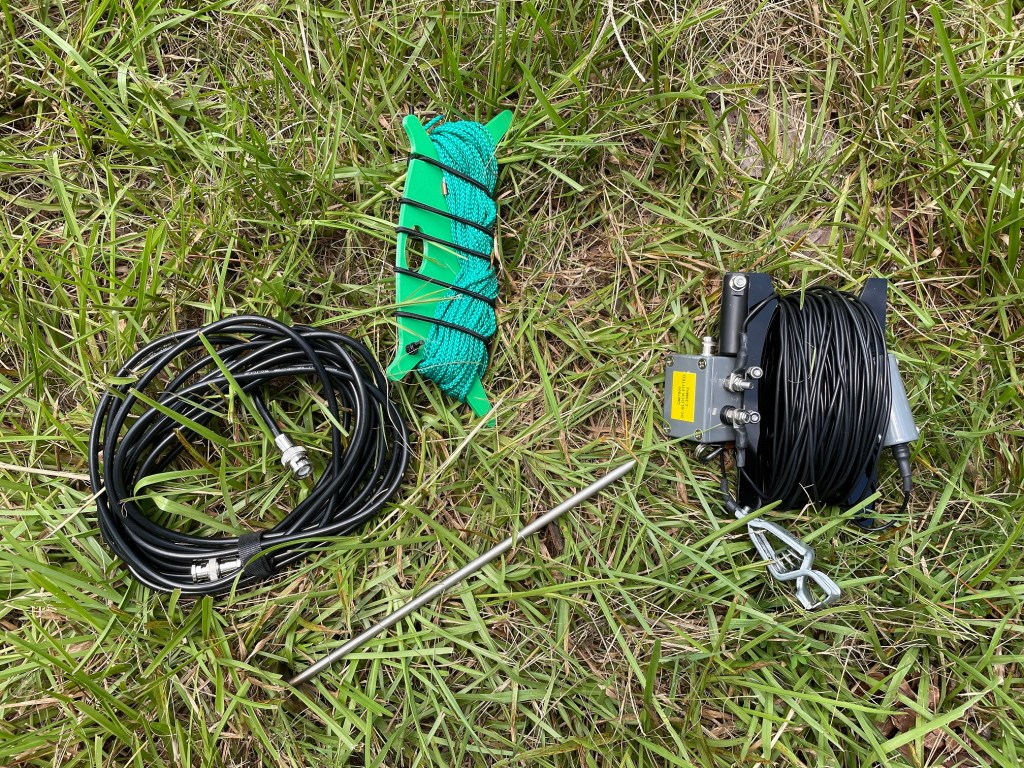
QM7005 antenna kit. Includes coax, halyard line with integrated throw weight, ground spike, antenna, and winder.

QMAC electronics was an Australian firm who produced affordable portable and mobile HF radio equipment. Their target market was aid agencies, NGOs, scientific expeditions, and military/paramilitary organizations. Their core product was the QMAC HF-90. Remarkably small for it’s time, the HF-90 boasted up to 50W of transmit power, frequency hopping, and easy field serviceability.

One of products in the QMAC catalog was an interesting terminated end-fed antenna, model QM7005. The antenna is considered terminated because of a load resistor installed in series along the transmitting element. It is an end-fed because it uses an unbalanced-to-unbalanced transformer (UNUN) to feed a long wire against a short ground or counterpoise wire. This antenna was marketed for HF manpack use or as emergency antenna for mobile operations.

The terminating load on this antenna is intended to deliver broadband coverage with acceptably low SWR from 2-30 Mhz. The HF-90 could handle SWR up to 3:1 and later models had significant built in protection for the RF final amplifier.

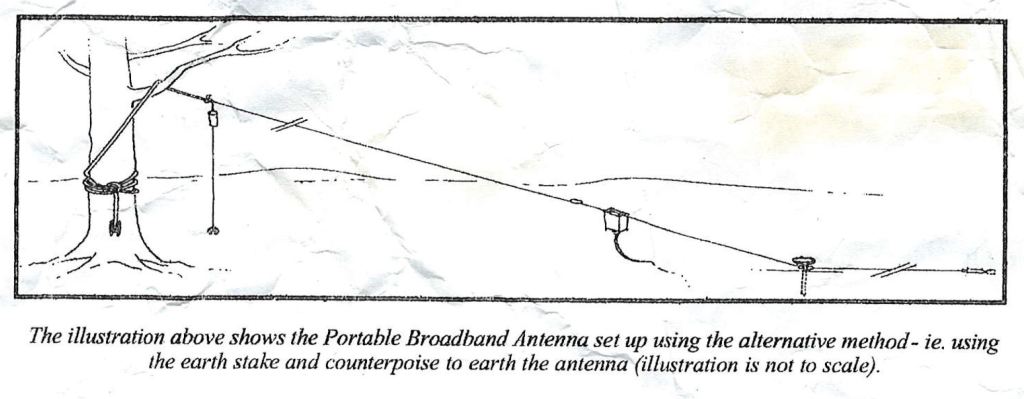
The included instructions recommend two deployment variations. The preferred method is to use a vehicle as tie off and grounding point. Alternatively, one may deploy the antenna counterpoise along the ground.

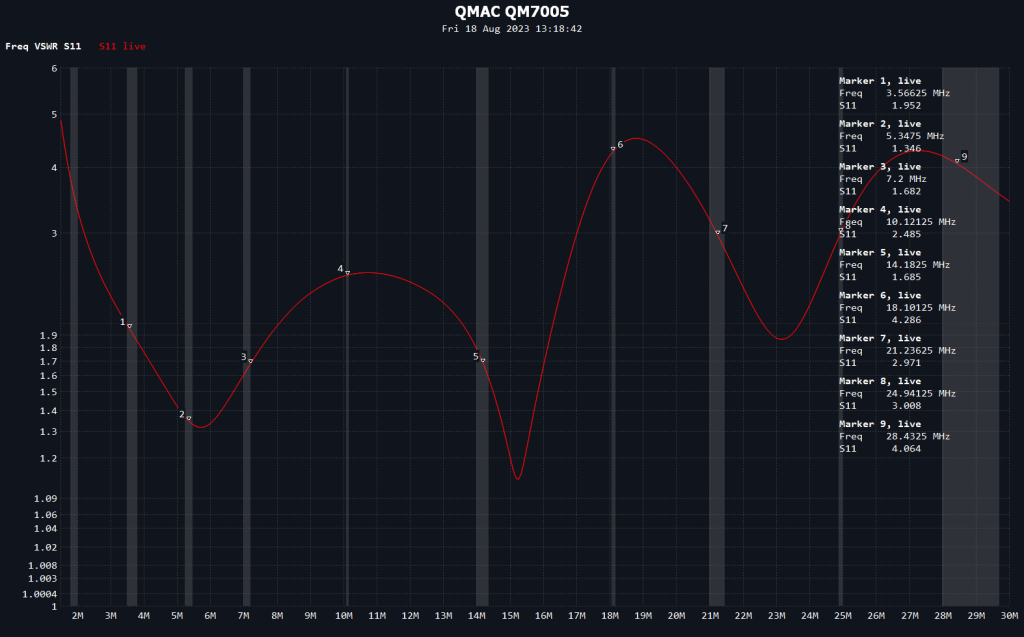
Ordinarily, I don’t drive a vehicle out to the areas I operate in so I decided to test the antenna using the alternate method pictured above. All the guy points needed to achieve this deployment come integrated into the antenna. Below is the NanoVNA sweep of the antenna from 1.5-30 Mhz.

VSWR sweep of the QM7005 using the alternate deployment method.

The QM7005 kept VSWR below 3:1 from about 2 Mhz up to about 17 Mhz. Above that point results varied significantly by frequency. For most purposes where this antenna and radioset would have been deployed, namely local and regional communication, this performance would have been sufficient. The most consistent performance for an antenna like this occurs on the NVIS frequencies anyhow as the radiating pattern of the higher bands ceases to be omni-direction and instead breaks ups into an increasing number of lobes and nulls.

In case someone would like to build or experiment with this type of antenna, I went ahead and reverse engineered it.

Moving from left to right on the diagram starting with the ground connector, a simple spring loaded alligator ground clip is used. The UNUN in my sample was wrapped with tape and sealant so I couldn’t discern the winding pattern without risking destroying it. Using a 450ohm resistive load, however, I was able to confirm it was a 9:1 ratio. The design used by QMAC was not as broadband as it could be if it used a different core or winding pattern. If you decide to build your own, I recommend using a FT140-43 toroid from Fair-rite as these give good broadband performance well above 30 Mhz. Lastly, the terminating load is a 1.1k ohm resistor. Again, I wasn’t able to disassemble the load for inspection but any non-inductive power resistor from Ohmite should work for this application.

While in the field, I used this antenna to check Winlink email and had no difficulty connecting to my usual gateways within NVIS range.

For your reference, I’ve also scanned a copy of the QM7005 Instruction Manual.

Padre

SurvivalComms EFHW Shootout

Bret from YouTube channel SurvivalComms published a comparison of several EFHW transformers. He too found the Fair-Rite 2643251002 to be a superior performer.

My only critique is that back-to-back testing of transformers isn’t good for absolute testing of transformer loss. Testing this way includes mismatch loss that would otherwise be cancelled out by a tuned wire. The mismatch loss I’m referring to is like running a high SWR coax on your coax and exaggerates how lossy these are.

Core loss in with a FT240-43 toroid with 2 turn primary.
Core loss in a 2643251002 toroid with 2 turn primary.

Bret’s testing is a good relative comparison though and his thermal testing clearly shows how lossy the common design on an FT-240-43 toroid is. I need to get around to some thermal testing on my 81:1 UNUN.

Having passed around my EFHW design for some third party testing I will say a high efficiency design isn’t for everyone. More thoughts on that in a future post.

73,

Padre

Linked EFHW: What if We Remove the Conductive Eyebolt?

81:1 UNUN with conductive metal eyebolt removed for testing.

TL;DR: The stainless eyebolt has such a small effect on the tuning of the transformer it can be safely ignored as a factor. For the full investigation into this question and why you should care, read on.

One of the things I’ve learned about EFHWs is they are rather sensitive to their surroundings, or at least the transformers are. The transformer is a tuned circuit performing a large impedance transformation. As a tuned circuit, it has resistive, capacitive, and inductive components. Ideally, the capacitive and inductive components cancel leaving a purely resistive load at the frequency of operation. Since this is a broadband transformer, we can’t adjust the capacitive and inductive reactances when in operation. Instead, we have to make a best effort to tune the transformer for optimal performance in our desired environment and then operate the transformer in such a way as to maintain that performance. Stray capacitance or inductance in our design may result in a less than optimal result.

So what does that mean? It means ensuring we do not introduce anything in the environment around the transformer that might affect the tuning.

My linked EFHW transformer design uses a stainless steel eyebolt to carry the tension between the support and the suspended wire elements. Mechanically, this is a great arrangement as it takes any lateral stresses off the polycarbonate enclosure and places them on a steel component that won’t bend, warp, or crack in extreme heat or cold.

The stainless eyebolt is very near the output of the transformer, however, so we can’t discount the possibility of it affecting the tuning and performance of the transformer. I’ve had it in mind to do some testing with and without the eyebolt to measure the effect it has and finally got around to doing so this past weekend.

20m as-built results with eyebolt in place.
20m results with eyebolt removed.

Removing the eyebolt shifted the SWR null on the 20m band down 26khz. At this frequency, the result is inconsequential. Using the classic formula for the length of a halfwave antenna in feet as 468/f, we find the difference here is the equivalent of a mere 0.7″ of wire.

On 30m, the SWR null shifts only 12khz. As you move down in frequency the effect will eventually disappear. For the purposes of this project, a linked EFHW covering 80-20m, it can be safely ignored. On higher frequencies, however, it might be a factor.

Given the direction of the observed shift, it is safe to assume the eyebolt is acting as a small stray inductance in the system. In practice, stray capacitance is much more likely to be a problem while fielding the antenna. While I had the antenna up and hooked up to the analyzer, I measured this effect by placing my hand near the transformer while running a sweep.

Holding my hand near the transformer output shifted the SWR null almost 250khz!

Holding my hand near the transformer output shifted the SWR null a whopping 248khz. In our operating environment, there are many things that can cause the same effect. Wet trees or leaves, the earth, or a nearby metal building or roof can all have drastic affects on the performance of an EFHW. This is why I recommend keeping your EFHW transformer at least six feet away from nearby objects, especially when first tuning the antenna so you have a reliable baseline.

I am working on learning OnShape so I can design a 3D printed enclosure for my linked EFHW. The results of this testing are encouraging and will give me more flexibility in my design.

Padre

Save that Old Tech! Fixing Up a Startek 2500 Frequency Counter

One of things I take joy in is finding old tech that is still useful. This impulse isn’t limited to radio gear either. I have a collection of restored forestry tools, mostly axes, I accrued after looking for a decent axe at the local hardware stores and came away wanting.

So, in any event, I recently came across a Startek 2500 frequency counter for sale on eBay. I recall ads for these from around the time I became a ham in the late nineties. At some point the company disappeared. I believe Startek and Optoelectronics may have been the same company as they were both based in Ft. Lauderdale, FL and their designs were rather similar.

For $56, I decided to take a chance and bought the old Startek. I have no idea what these go for but I’ve looked at older frequency counters from other companies that still go for several hundred dollars used. For my purposes, mostly experimentation and field radio, this handheld unit is probably superior to a benchtop model anyhow.

A quick ops check after receiving the Startek proved the unit still worked. I had to power it from an external 12VDC source though as the internal batteries didn’t seem to take a charge. Those old batteries can be a source of grief so after the initial ops check I decided to do a teardown and inspect the internals.

Leaky Nickel Cadmium batteries inside the Startek 2500.

Sure enough, the old nickel cadmium internal batteries were leaking corrosive material and needed to be removed. Removal wasn’t difficult. Probably a 10 minute job. I haven’t decided if I’ll replace them or not. For now, I’m content to run it off one of the many LiFePO4 batteries I have for powering portable equipment.

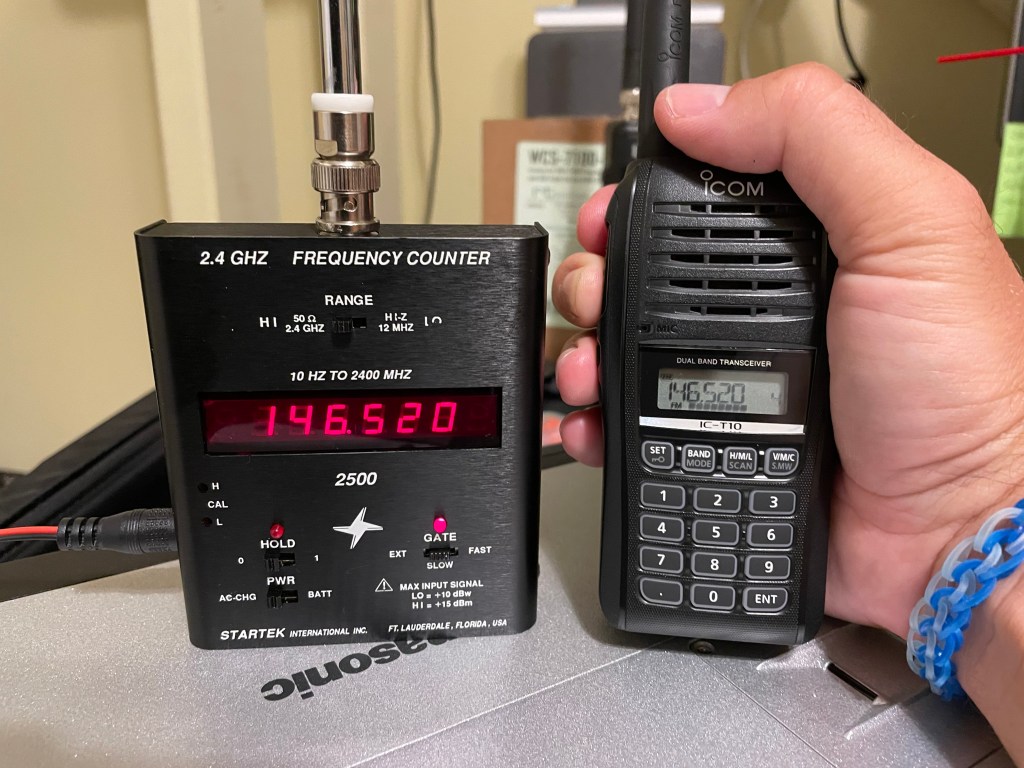
Testing the Startek 2500 against a 2 meter HT.

Was it worth the trouble? I think so. The Startek works as well as it ever did and is a solid piece of American made tech. As the photo above shows, it’s remarkably accurate considering this is probably about 20 years old. It might be off a bit on HF frequencies but I need to do more testing to validate one way or another.

Happen to have a manual for this unit? I’d love to get a copy of the documentation for this gadget so if you have a copy please leave a note in the comments.

Padre

Ugly but it Works: MARS/CAP Mod for the Icom IC-T10 HT

I don’t often use HTs but when I do I want two things. First, I want a speaker I can hear. Many rugged HTs are guilty of being difficult or impossible to hear outside of a quiet room (I’m looking at you VX-8DR). The second thing I want is good battery life. I should be able to charge it and put in on the shelf for a while and still have useful life in when I need it (I’m looking at you TH-D74). So when Icom announced the IC-T10 I went ahead and pre-ordered one through HRO.

On the two points above, I have not been disappointed. It has great battery life and rarely needs to be charged. The speaker is plenty loud so can be heard in a moving vehicle or noisy venue. It isn’t the best sounding receiver but it is plenty intelligible. It is a direct conversion receiver with all the baggage that comes with that. Namely, it is easy to desense in a strong RF environment and it is prone to intermod. If you understand those limitations it is a fine, rugged radio that is very usable for analog FM operations.

At the onset, this radio lacked a published MARS/CAP mod. Recent increased attention on bad actors may have the manufacturers thinking twice about offering this option. Worry no more though, the IC-T10 does have an option to expand the TX range to match the RX range of the radio. Since the radio appears to be heavily based on Icom’s Part 90 offerings it makes sense the hardware was capable all along. HRO now offers this mod at time of sale but it’s a whopping $80! We’ll see why as we move along.

I found the mod published at mods.dk. As a hat tip them, I won’t republish their work here but rather encourage you to support their work by signing up for an account. What I will do is validate that their published mod works and provide a few details from my experience.

The mod involves moving a 47K resistor from one pad to another. Easy right? Well, the resistor is a 0402 package SMD resistor. Its about the size of two grains of sand. Gratefully, I’m blessed with excellent near vision and can normally pull off this sort of thing with the naked eye. I was able to remove the resistor but in the process lost it on the workbench somewhere. So I had to order another from Mouser. Since they were pennies a piece I ordered 10.

Since I had to wait anyway I broke down and ordered an inexpensive magnified headset with light on Amazon. Here is the model I ordered. I’m sure most of these are the same but I can say this was entirely sufficient for what I wanted to do and should prove handy in the future.

The 47K resistor that needs to move for this mod is circled in red. This photo was taken with 2x telephoto on my iPhone through the 3.5x lens on my magnified headset. Yes, it is that small.

The photo above shows the resistor in question. The bare pad is where the resistor was initially. You are supposed to move it down to the bottom pad on that trace. You’ll notice that I ended up with a cock-eyed resistor. This was my second attempt on this resistor so I was starting to get nervous about damaging the PCB. I ops checked this and it worked so I left well enough alone at this point and put it back together. Normally, I take a lot of pride in my solder work but I’ll admit I haven’t done very much SMD rework. I’ll certainly look for opportunities to get more practice moving forward.

Here is what I learned working this project. 1) Magnification is good. Even with good eyesight this was too small for me. 2) Clean your contacts well after removing the part so that you can get it to sit flush in its new location. 3) Use an appropriately small tip. Videos showing the technique of wide solder tips across two terminal devices didn’t work for me. 4) Chip Quik no-clean solder flux works great. 5) It wouldn’t hurt to invest in a hot-air rework gun for these jobs. 6) Even after buying a few extras, I came out ahead vice having someone else do this and had the benefit of learning some new skills.

Know your limits but realize if you never push them you’ll never make any progress. It might be ugly but so long as it works, who cares!

Anti-Field Day (AFD) 2023 Detailed After Action Report (AAR)

There is nothing better than combining portable HF radio ops with an overnight trip to the backcountry.


According to the league, the stated objective of Field Day is:

To contact as many stations as possible on the 160-, 80-, 40-, 20-,15- and 10-Meter HF bands, as well as all bands 50 MHz and above, and to learn to operate in abnormal situations in less than optimal conditions.

ARRL (https://www.arrl.org/field-day)

ARRL Field Day is one of my favorite activities on annual calendar of ham radio events. So it is for many other amateur operators. So popular, in fact, the included bands are wall to wall signals. This can be a frustrating experience for those who are serious about operating low power “in abnormal situations in less than optimal conditions.” Optimizing for ARRL Field Day doesn’t necessarily mean you have a practical station for the types of contingencies the league hopes you are preparing for.

Winter Field Day seems to attract more practical minded participants. Cold weather seems to weed out the faint of heart. Still, it operates on the same rules as summer Field Day so still encourages a contest mentality.

As an alternative for 2023, Gaston, KT7RUN, came up with the idea of Anti-Field Day (AFD). The concept was to operate during the same operational period as ARRL Field Day but do so on the WARC bands where, by gentleman’s agreement, contest activity does not occur. Instead of the make as many contacts as possible contest mentality of Field Day, the objective of AFD was to make targeted contacts with a pre-determined list of participants. This required actual communications planning to determine the bands and times most likely to permit contact with the target stations. JS8CALL was chosen as the operating mode for its excellent weak signal characteristics, automation capabilities, and ability to store and relay messages for stations that are outside of your coverage area.

Planning

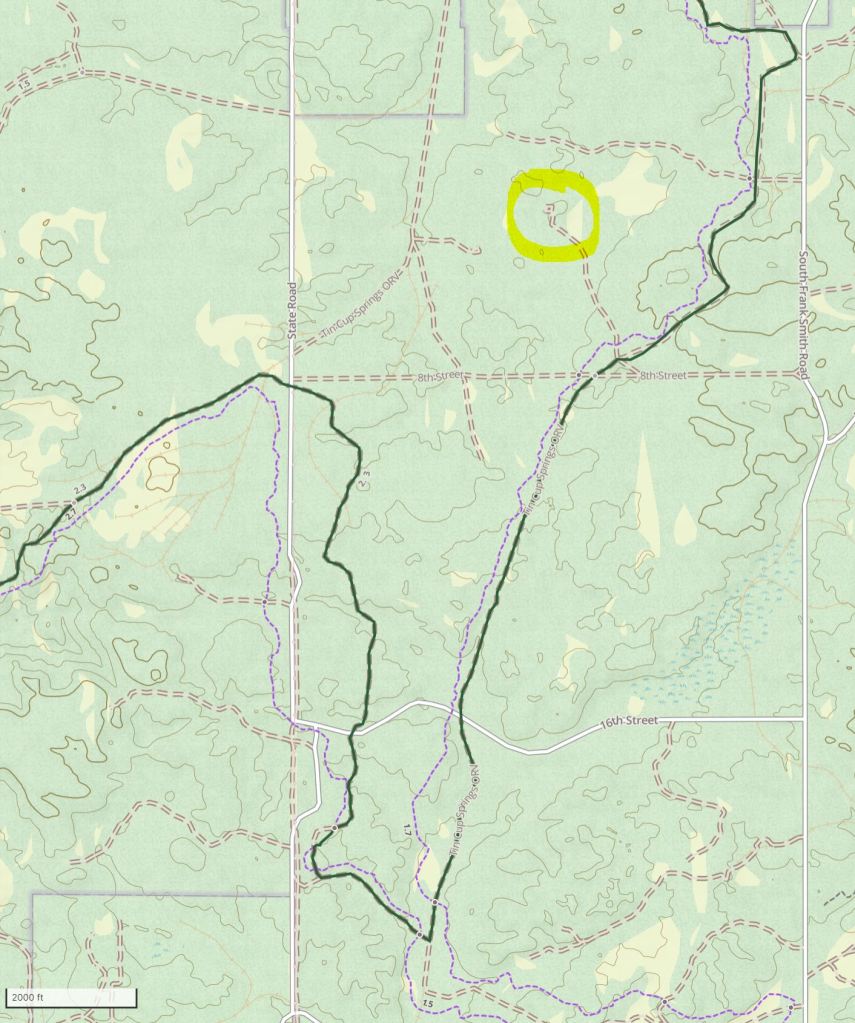
I was on vacation to Michigan during AFD so planned to operate from there. The challenge of operating from an off-grid field location was irresistible so I started looking for options near where I was staying. A friend turned me on to the Tin Cup Springs Off-Road Vehicle (ORV) trail in the Pere Marquette State Forest. After doing a map recon and confirming that dispersed camping was allowed there I committed to this location for AFD.


I’ve had a subscription to Gaia GPS for a couple of years now and it proved an excellent tool for conducting a map recon of the operating location. In addition to accessing countless maps from topos to satellite imagery over the internet, Gaia GPS allows you to select map layers to and locations to save off-line so these maps were available to me even off-grid.

In the image above, I’ve circled the area I identified in advance as my preferred site to setup camp. This area was off the main trail and slightly elevated. Since distance contacts where going to be required I didn’t want to setup in a valley that might block lower RF take-off angles. Once I arrived here, I parked and surveyed the area. This entire area is heavily wooded so there was enough clear ground to setup camp but not much more.

Luckily, I knew AFD was in the planning before I departed and so was able to pack the gear I thought I would need. For this outing I took my FT-857D and End-Fed Halfwave (EFHW) antenna kit. For power, I took a supplemental 23AH LiFePO4 battery to augment the 10AH battery packed with the radio. Additionally, I brought a 100W Powerfilm solar panel. Past experience with this combo gave me confidence that I would be able to operate off-grid all weekend if needed. Lastly, I had 2x CF-20 Toughbooks with me as I was in the process of setting up a new one when I left home and wanted to keep working on it on the road. This would prove fortuitous as we shall see later.

It is worth pointing out that this is a fairly heavy load to carry. I would hike with it for a day it would be too much for a multi-day man portable hike for a single person. On the other hand, one needs to be realistic about power needs when operating a 20W radio and laptop for 24 hours in the field. A less power hungry QRP rig would draw less power but would have reduced the chance of successful contacts coast to coast. Everything is a compromise but for this deployment I chose to pack for a vehicle borne mission and kitted out accordingly.

Early in the planning for AFD it looked like 12m, 17m, and 30m would all be included in the comm plan. Since my EFHW kit only covers 30m I built a linked dipole using a combination of hardware store materials and gear I had with me.

Execution

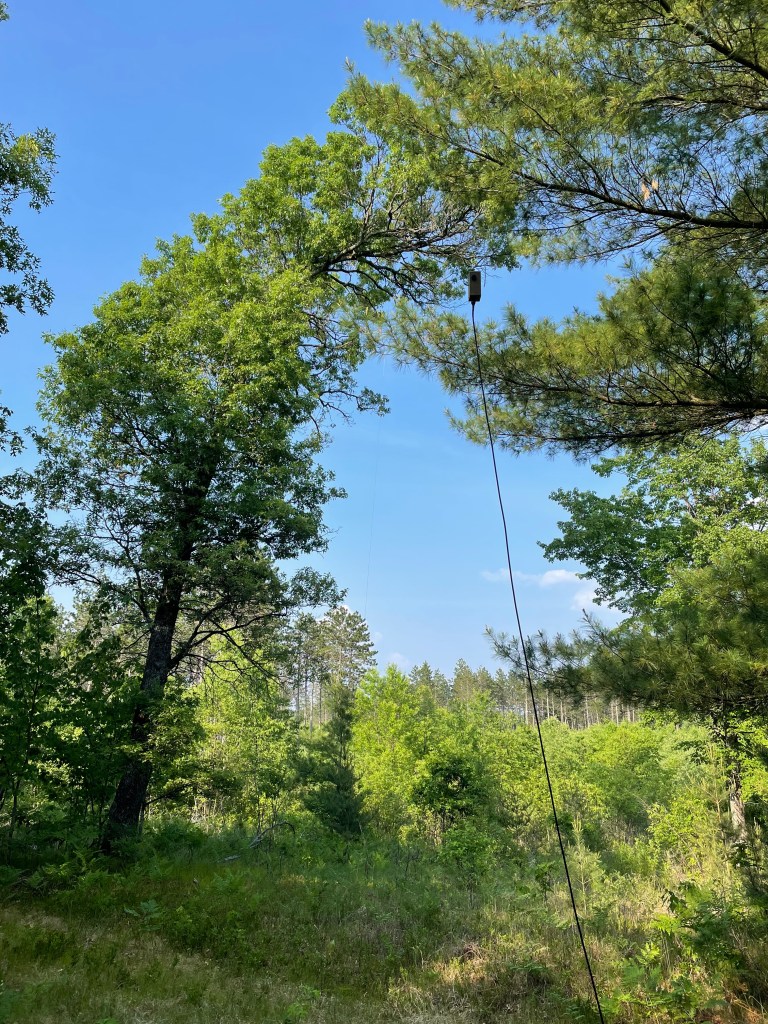
On arrival to the site, my most important task to was to deploy my antenna. I was flexible on where the rest of my equipment would go but I knew most of my contacts were going to be south and west of me so wanted to deploy my EFHW accordingly. A sloper configuration is mildly directional so luckily I had a tall tree at the site with enough adjacent space to allow me to orient it to the southwest.

30m EFHW deployed for Anti-Field Day 2023. The apex of the sloper was about 45′ up in the curved tree in the background. It sloped down towards the southwest leaving the transformer about 8′ above ground.

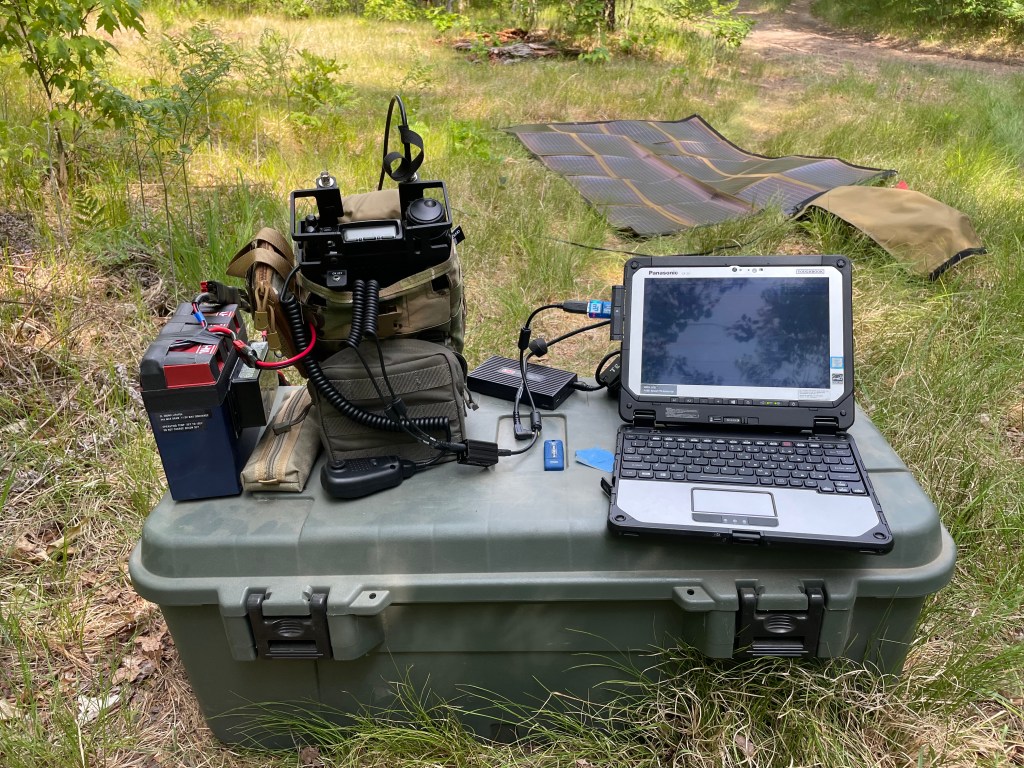
I used the tonneau cover on my Ranger as space to unfold the solar panel. The radio and computer were hooked up next to the truck and I was on the air in time to send my first JS8call heartbeat 20 minutes before startex.

As it turned out, this was too close to the antenna and I started having RFI issues with the CF-20 about 30 minutes into the exercise. I’ve experienced this issue a couple of times before. With the CF-20, too much RF causes the touchpad and USB ports on the docking station to lock up. Recovering from this requires powering off the Toughbook and removing the batteries long enough to reset the hardware. This is the first time I’ve had this issue with my EFHW. While end-fed antennas have a reputation for causing RFI issues, I have measured this with an RF current meter and found my EFHW to be comparable to a dipole with no BALUN.

The RFI issue wasn’t an immediate show stopper. The CF-20 features a touch screen as well so I was able to continue operating for a time while I troubleshot the issue. Moving my operating position further from the antenna was all I needed to do. I had a second CF-20 with me so, being impatient to get back on the air, I used the backup for several hours and had no further RFI problems.

I moved a couple more times throughout the day chasing the sun. I wanted to optimize my use of solar to keep the battery charged for overnight ops so had to keep the panel exposed as the sun moved lower in the sky. Being in a small clearing meant having limited areas of sun exposure throughout the day. While it wasn’t a big deal, finding a larger clearing will be a consideration next time I do an event like this.

My car camping box made for a great expedient field desk during this exercise.

My laptop power supply also gave me RFI issues. Recently, I found a good deal on a case of Lind Toughbook power supplies. The advantage of these units is their dual voltage capability. Namely, they can run of 120VAC or 12VDC thus saving you from having to carry two power supplies. Lind builds these for the emergency services market and they have a good reputation. Unfortunately, I found that this power supply creates a measurable amount of noise on HF frequencies. Testing at home after the exercise confirmed these are generating a large amount of RFI due to a ground loop of some kind. The issue couldn’t be resolved with ferrite but did go away when the laptop and radio were powered by separate batteries. This isn’t practical for me so I may be ditching my Lind power supplies and reverting back to the PWR+ units I’ve used for the last two years in the field with no issues. The Lind units I have are model CF-LNDACD90. Lind makes many models and it could be that others do not suffer from this issue.

The remainder of exercise execution occurred in accordance with the comm plan without any issues. I operated from 1800 UTC Saturday to 1500 UTC Sunday. Others may have continued operating on Sunday beyond 1500 UTC but thunderstorms were coming in. That said, activity had largely tapered off by that point. During the operational period, I was able to make contact with almost everyone participating, either by direct contact or by relay.

Conclusion

Here is a summary of what I learned this weekend.

SUSTAIN: 1. The FT-857D and EFHW antenna kit both performed well and were easily adapted to the requirements of this exercise. 2. JS8CALL is an excellent weak signal mode with features that enable effective asynchronous communication. 3. The comm plan was well developed and allowed almost everyone to participate fully. 4. Continuous training with the same equipment builds familiarity and accelerates problem solving when issues do occur.

NEEDS IMPROVEMENT: 1. There was no pre-execution brief for participants. Having one would have clarified the requirements for all participants. 2. The COMMPLAN did not directly address relays or MSG deposits, at least in the example log provided. I suspect I contacted more folks than I logged because of this. 3. The first few comm windows had issues with simultaneous TX and the channel capacity with all the participants. A net control operator should be assigned or a staggered TX plan established to reduce the need for re-transmits. 4. Not all participants switched to slow mode on the schedule prescribed by the comm plan.

All in all, this was a great event and I look forward to participating again in the future. Next time I may try to challenge myself by operating entirely out of a rucksack instead of a vehicle. This would challenge me to use a lighter kit all around.

A Quick Linked Dipole for the WARC Bands

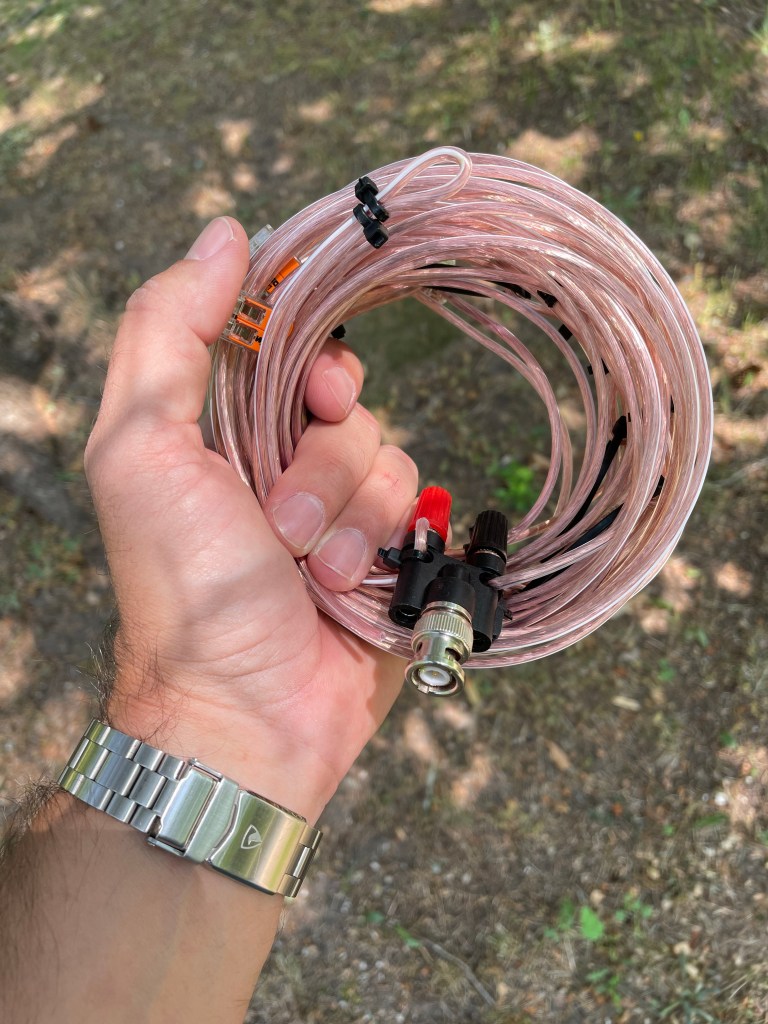
I’m travelling at the moment but need a WARC band antenna for TTP’s Anti-Field Day event coming up this weekend. I have individual antennas that cover 30m and could cover the other bands with a tuner but I decided to go to the hardware store and see what I could come up with. With some speaker wire, zip ties, and WAGO connectors I was able to put together a nice linked dipole to cover 12, 17, and 30m.

WAGO connectors and zip ties work remarkably well for a quick linked dipole.

This project was my first use of WAGO connectors. It was just happenstance that the local hardware store, Menard’s, had them. While familiar with them, I’ve never seem them in a store before. They probably aren’t the most durable solution but but they are small enough and convenient enough that I’m adding them to my radio possibles pouch for future improv solutions.

The cobra head and N9SAB nano BALUN are part of my normal portable radio kit so were already on hand to provide a feedpoint for this project. With the arborist throw weight and cordage from my EFHW kit I have a complete system ready for this weekend.

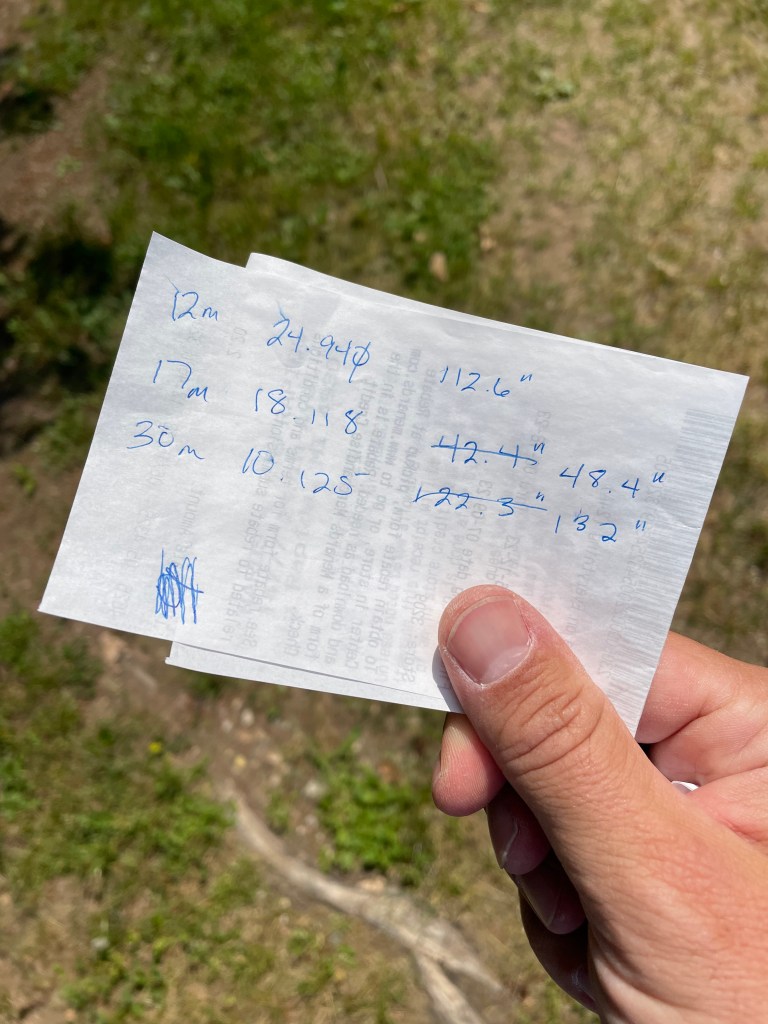
The whole project took about two hours to complete. It would have gone much quicker but I got cocky and decided to cut my elements right at 234/f after 12m ended up right on. It turns out 17 and 30m needed to be longer so those elements got cut twice….

My final dimensions for the WARC band linked dipole.

Hopefully this provides inspiration for your own projects.

Padre